Knowable Insights Home
With this release, you now can access a personalized home page when you sign in to Knowable Insights.
Key features of the Home page:
- My Recent Activity – quickly find your recently viewed documents, searches, and uploads.
- Contract Portfolio Statistics – view core metrics on the documents in your organization’s repository.
- Portfolio Analytics – understand key information about your contract portfolio, including which contracts are expected to lapse for the next 12 months and which contracts are active or inactive.
My Recent Activity
Recent Documents

The Recent Document pane displays the last 10 contracts you’ve viewed in KI. Each document in the list includes:
- A Contract Status icon to determine if your recently viewed document is active, inactive, unknown, or pending review
- Identifying information for the contract, including document title, document type and counterparty where available. Documents pending review display the file name only.
- The last viewed date
Simply click on the document’s title or file name to open the Contract Details page.
Searches
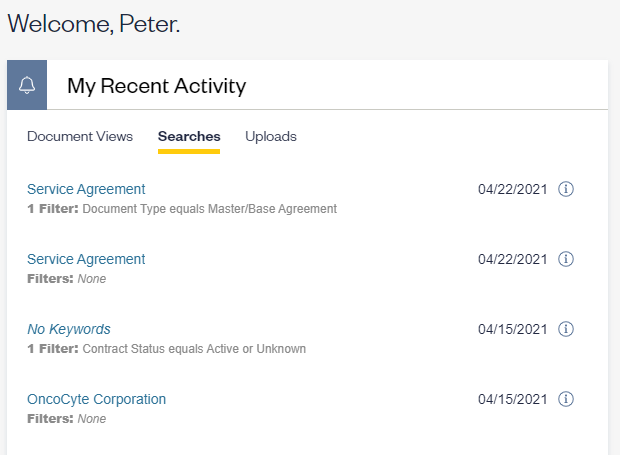
The Searches pane displays the last 10 searches you’ve performed using keywords, field filters or contract status buttons. All searches display:
- Keywords used in your search (in blue text)
- The Number of filters applied
- Field filter names and values selected
- The last searched date
An info icon is visible next to the date of your last search. Click on the info icon to reveal the full set of search and filter criteria used in the search. Click “Search” to re-run the same criteria. You can also click the x in the top right corner to return to the search panel.
Uploads
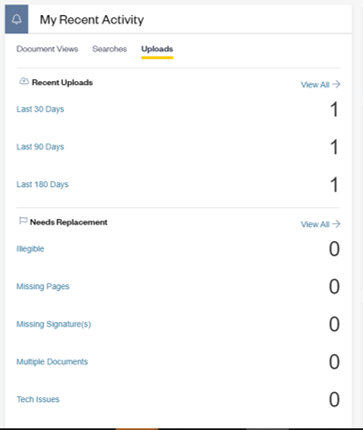
If you can upload documents, your home page offers you quick access to your recent uploads and contracts you need to action.
- The Recent Uploads section highlights how many contracts you have uploaded in the past 30, 90 and 180 days.
- View totals for each time period: Last 30 days, Last 90 days and Last 180 days.
- Click on the hyperlink for each time period to access the underlying documents
- Click on “View All” to access your complete upload list regardless of when they were uploaded.
- The Needs Replacement section highlights documents requiring your action. When document issues occur, you are asked to replace the document via the Document Details page. In this section, you can:
- View totals for each document replacement reason: Illegible, Missing Pages, Missing Signature(s), Tech Issues and Multiple Documents
- Click on the hyperlink for each document issue to access the underlying documents to review
- Click on “View All” to access all of your contracts requiring replacement
Contract Portfolio – High Level Statistics
Core metrics include:

- Documents: The number of documents available in your organization
- Counterparties: The number of unique counterparty names visible in your contracts.
- Families: The number of unique families
- Documents Pending Review: The number of documents that have not been reviewed by Knowable.
Portfolio Analytics
The Home page also offers you a quick glimpse at portfolio analytics related to your organization’s contract makeup. Analytics available include:

- Lapsing Contracts by Month – for the upcoming 12 month period
- Contract Status
- Termination for Convenience
- Term Type
- Document Type
To access the underlying contract data, click on the chart and values of interest. You will be directed to the search results in the Contracts grid.
Comments
0 comments
Please sign in to leave a comment.