You can download copies of your contracts or export contract data if authorized by your organization.
Download Contracts
You can download single contracts from the Contracts tab, the Contracts Details View, and the Family View. You can download multiple contracts from the Contracts tab and the Family View only.
To download multiple contracts at once, go to the Family View or the Contracts tab:
- Click checkboxes on contract rows to select individual contracts

- Click the checkbox on the upper row to select all contracts on the current page

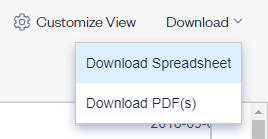
- Once you have selected your contract records, Click Download → Download PDF(s) from the Contracts table header row

- You will view a banner once you have submitted your request
- An email will be sent to your inbox from no-reply@contractorganizer.kci.theknowable.com with a link to access the selected contracts
- Please note that the link in the email will expire after 24 hours
To download a single contract:
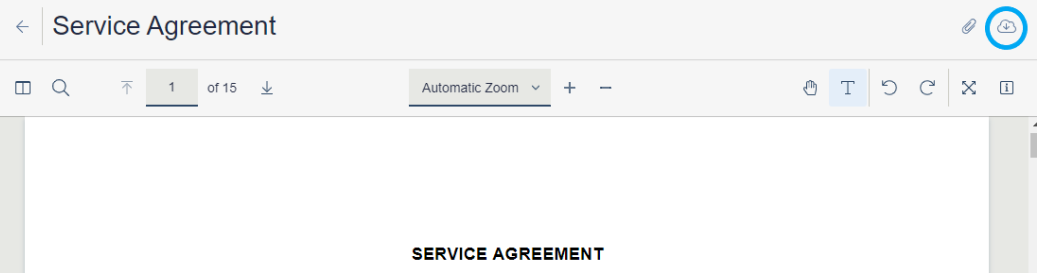
- Click either File Name or Document Title in a contract row to view it

- Click the Download icon to save a copy locally
Export Contract Data
To export your contract data, narrow down contract choices by making Search or filter selections prior to requesting your data export. Select the contracts for which you want to export data by using the checkboxes in the Contracts table.
-
Click checkboxes on contract rows to select individual contracts
-
Click the checkbox on the upper row to select all contracts on the current page
-
Do not select any checkboxes to download all results across multiple pages
Once you have selected your contract records, Click Download → Download Spreadsheet from the Contracts table header row.
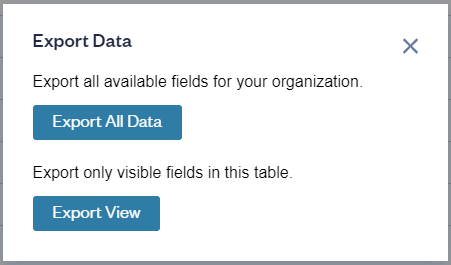
A pop-up window opens with the following options:
- Export All Data. This option offers an Export with all available fields for your organization
- Export View. The “Export View” option exports the visible fields in your current table
An email will be sent to your inbox with a link to access the selected contract data in a .xlsx file. Please note that:
- The link in the email will expire after 24 hours
- Large data export requests (data for more than 30,000 documents) can take a long time - if you need such an export, please reach out to Knowable to get you the data sooner
Comments
0 comments
Please sign in to leave a comment.